
Want to improve your golf swing without expensive lessons? Learn how to analyze your golf swing at home using Computer Vision Proprietary AI Model tools, free, no sensors, no equipment needed. Download XView AI today.

You don't need a coach standing next to you at the range to know your swing is off. You can feel it: the mishit, the pull, the slice that costs you two shots before you even reach the fairway. The frustrating part? Without real feedback, you're left guessing.
Traditional golf lessons are expensive. A single session with a qualified instructor can run $80 to $200 an hour. And even if you can afford it, you only see your coach once or twice a week, which means the other 95% of your practice sessions happen without any meaningful feedback at all.
The good news: that's changing. AI-powered golf swing analysis has made it possible to get professional-grade biomechanics feedback anywhere, anytime, for free. Here's exactly how to analyze your golf swing at home and start making real, data-driven improvements.

Why Self-Analysis Has Always Been Difficult
Most golfers who try to self-analyze make the same mistake: they rely on feel. But feel is notoriously unreliable. What feels like a square clubface at impact is often several degrees open. What feels like a balanced finish is frequently a reverse pivot in disguise.
Even video helps only so far. Watching a plain recording of your swing from one angle tells you some things, but not everything. You miss depth cues, rotation data, weight transfer patterns, and the three-dimensional body mechanics that actually determine power and consistency.
This is why professional golfers have always had access to tools like TrackMan and motion capture systems that cost tens of thousands of dollars. Until recently, that level of analysis simply wasn't available to the average golfer.

What You Actually Need to Analyze Your Swing at Home
The good news is that you don't need much. Here's the basic setup:
What you need:
- A smartphone (iPhone)
- Enough space to swing: a backyard, garage, living room, or driving range bay
- A way to prop or mount your phone at hip or chest height, angled to capture your full swing
That's it. No sensors. No wearables. No special equipment.
With an app like XView AI, your iPhone's camera becomes a full 2D and 3D biomechanics analysis studio. The app uses a Computer Vision Proprietary AI Model trained on millions of golf-specific data points to track your body's movement without requiring you to attach anything to your body or your club. It analyzes and tracks biomechanics, golf club movement, ball movement, grip, club head, and club shaft, covering every element of your swing in one place.

How to Set Up Your Home Golf Swing Analysis Session
Step 1: Position Your Phone
Camera angle matters. For the most useful analysis:
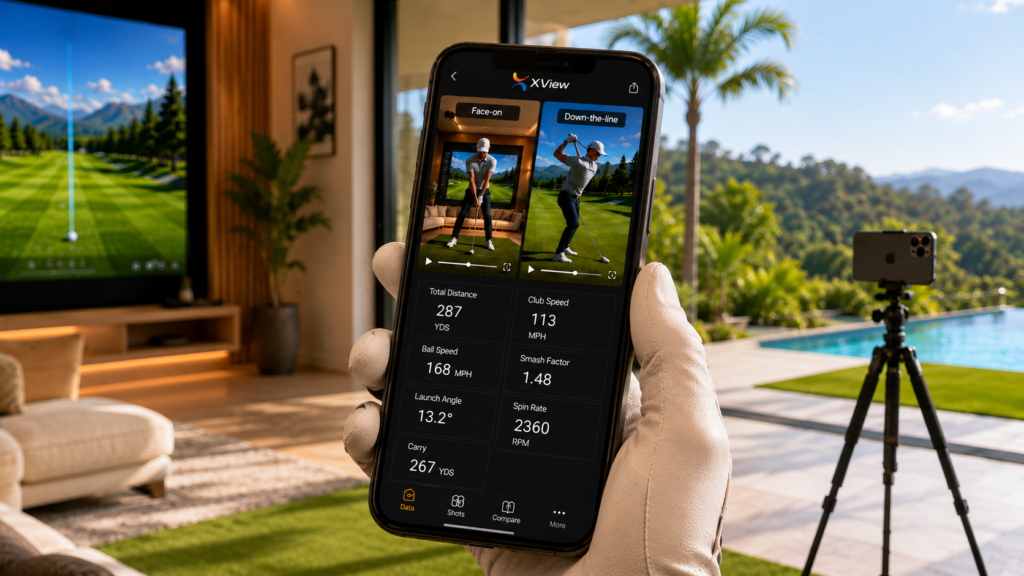
- Face-on view: Position your phone directly in front of you, roughly at hip height. This captures weight transfer, spine tilt, and head movement.
- Down-the-line view: Position your phone behind you along your target line, at about hand height. This captures club path, swing plane, and hip and shoulder rotation.
For the most complete picture, record both angles during the same session.
Step 2: Upload Your Swing to the App
Getting started is straightforward. Just upload or record your swing directly inside XView AI. The app accepts video you've already captured or lets you record a new one right inside the app. No complicated setup, no calibration process, just upload your swing and let the AI go to work.
Step 3: Select Your Analysis Tools and Review Your Results
Once your swing is in the app, select which biomechanics overlays you want to apply. XView AI's Computer Vision Proprietary AI Model then processes your swing and delivers 2D and 3D analysis across every key dimension: body mechanics, club path, ball movement, grip position, club head tracking, and club shaft angle, giving you a complete picture of what's actually happening in your swing.
What to Look For When You Analyze Your Golf Swing
Once you have your analysis running, here are the key areas to focus on:
Power Generation and Sequence
A powerful golf swing isn't about muscle. It's about sequence. The kinetic chain should flow from the ground up: feet, hips, torso, arms, club. If your upper body leads your lower body, you're losing significant power before the club even reaches impact. AI analysis can identify where your sequence breaks down and how to correct it.
Swing Plane
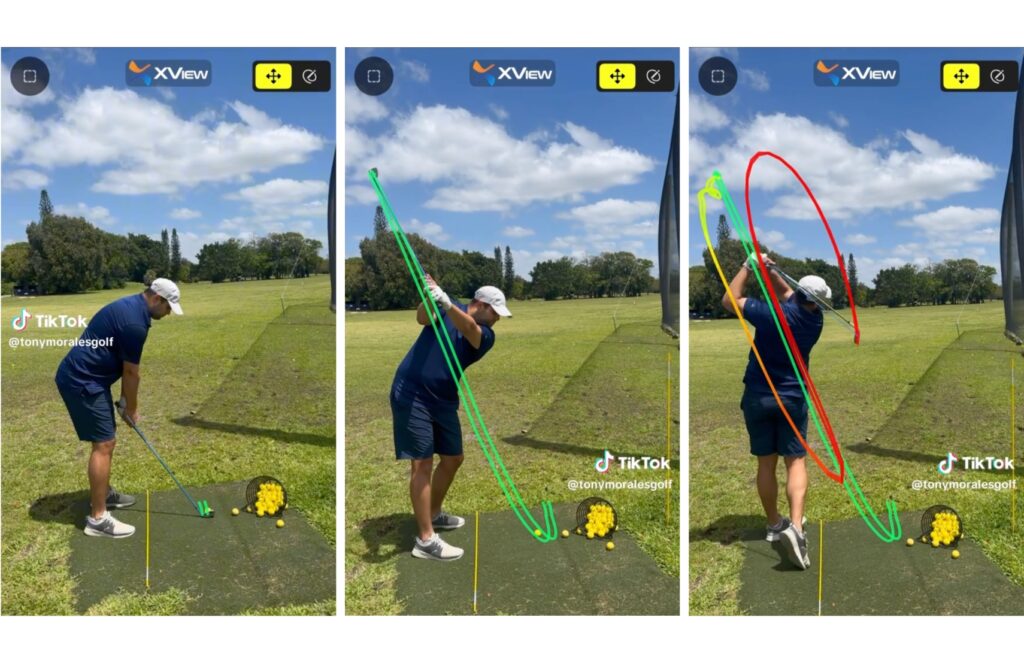
Your club should travel on a consistent plane from takeaway through impact and into the follow-through. Deviations from your natural swing plane cause the variety of off-center hits that plague amateur golfers: topped shots, fat contact, and slices. A 2D and 3D swing analyzer shows your actual plane angle from multiple perspectives simultaneously, which single-angle video can't replicate.
Hip and Shoulder Rotation
Insufficient hip turn in the backswing limits your power ceiling. Insufficient shoulder turn creates a steep downswing. The ratio between hip and shoulder rotation is one of the most consistent predictors of clubhead speed. XView AI tracks this ratio and shows you exactly how yours compares to ideal ranges.
Weight Transfer and Balance
Where your weight is at impact determines your contact quality. The best ball-strikers shift weight forward aggressively into the lead leg during the downswing, arriving at impact with the majority of body weight on the front foot. AI body tracking quantifies your weight distribution through the entire swing, so you can see, not just feel, how your balance is shifting.
Club and Ball Tracking
One of the most powerful aspects of XView AI's analysis is that it doesn't stop at your body. The Computer Vision Proprietary AI Model also tracks your club head path, club shaft angle, and ball movement, giving you real data on what the club is actually doing through impact, not just what your body is doing.
How Coaches Use XView AI to Give Better Feedback
XView AI is built to assist coaches in determining the correct movement patterns for their students. A coach using XView AI can analyze a golfer's movement in full 2D and 3D detail, then deliver precise, data-backed instructions based on exactly what the swing data reveals, not just what they observed with their eyes in real time.
For golfers working with a coach, this means your instructor can review your swing data between sessions, track your progress over time, and give you feedback grounded in biomechanics rather than general observation. For golfers practicing on their own, the AI acts as your analytical layer, identifying what's off and pointing you toward the specific corrections that will actually move the needle.
Tony Morales, Director of Golf Instruction at Tony Morales Golf Academy, put it simply: XView AI "analyzes data better than anything I've ever used."
Making Practice Count: Using Your Analysis to Improve
Data without action is just noise. Here's how to turn your swing analysis into real improvement:
Focus on one thing at a time. Trying to fix your takeaway, your hip turn, and your impact position simultaneously is a recipe for paralysis. Pick the metric that's most off and drill it for two to three sessions before adding another variable.
Compare swings over time. XView AI lets you track progress and share your analysis videos, which means you can literally see how your mechanics have changed week over week. This kind of visual progress is one of the strongest motivators for continued improvement.
Use it between lessons. If you work with a coach, AI analysis is a powerful complement. Your coach gives you the prescription; the app lets you monitor whether you're executing it correctly between sessions.

Why XView AI Is the Best Golf Swing Analyzer for Home Use
There are several golf analysis apps available, but XView AI stands apart in a few critical ways.
True 2D and 3D analysis, not just basic video. Most apps overlay simple angle lines on a flat video. XView AI uses genuine 2D and 3D motion capture powered by a Computer Vision Proprietary AI Model trained on millions of golf-specific data points, capturing depth, rotation, club movement, and spatial positioning that single-angle video simply can't see.
Full tracking across every dimension. XView AI tracks biomechanics, golf club movement, ball movement, grip, club head, and club shaft, giving you a complete, multi-dimensional picture of every swing.
Markerless technology. No sensors to attach. No special suits. The AI identifies and tracks your movement automatically from standard video. Martin Borgmeier, the World Long Drive Champion, uses XView AI in both his outdoor sessions and his indoor studio because it goes wherever he goes.
Professional-level feedback, free. The same standard of analysis previously reserved for tour players is now available to anyone with an iPhone, at no cost.
Works anywhere. At the range, in your backyard, in your garage, in a hotel gym. XView AI doesn't require an internet connection to analyze your swing, which means your training doesn't stop when your Wi-Fi does.

Start Analyzing Your Swing Today
Improving your golf swing has never been more accessible. You don't need to book a lesson, buy expensive hardware, or wait for ideal conditions. You need your phone and five minutes.
Just upload your swing to the app, select your analysis tools, and get the kind of biomechanics feedback that used to require a TrackMan, a studio, and a coach on retainer.
XView AI gives you a Computer Vision Proprietary AI Model trained on millions of golf swings, 2D and 3D analysis, and full tracking of your body, club, and ball, in your pocket, free, and ready the moment you are.
Download XView AI free on the App Store.
Every movement counts. Make yours better.
XView AI is available free on iOS. Developed by IdeasLab, making professional-grade motion analysis accessible to every athlete.